What a JWT Decoder Can Check Before You Debug an Auth Failure
Read a JWT header and payload first so you can separate token-shape issues from signature, session, and permission problems.
Open JWT Decoder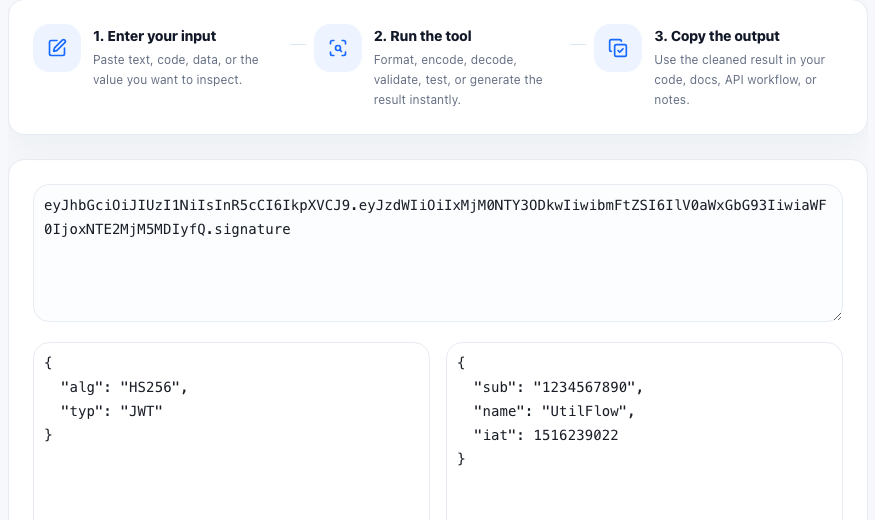
A JWT decoder helps with the first layer of auth debugging: understanding what the token says about itself. That means reading the header and payload claims before you start blaming middleware, cookie transport, session storage, or permission logic.
What a decoder can actually tell you
- Which algorithm the token header says it uses.
- Which issuer, audience, subject, or tenant claims are present.
- When the token expires, when it becomes valid, and when it was issued.
- Whether expected custom claims such as role, scope, or org ID are missing.
- Whether the token is malformed, truncated, or copied with the wrong segments.
What it cannot prove
Decoding is not signature verification. A decoder shows the readable header and payload, but it does not prove the token was signed by a trusted issuer or that the claims should be accepted by your application. That distinction matters because an auth bug may live in verification, key rotation, clock skew, or session binding rather than in the token body itself.
A useful auth triage sequence
- Decode the token and confirm the payload shape matches what the app expects.
- Check exp, nbf, and iat first when the failure appears time-related or environment-specific.
- Compare aud, iss, and custom claims with the API or middleware configuration.
- Only after the visible claims look correct should you move on to signature verification, JWKS lookup, or cookie and header transport checks.
Why this saves time
Many auth incidents are not cryptography problems. They are mismatched audiences, expired preview tokens, missing roles, wrong tenant IDs, or stale tokens copied from another environment. Reading the token structure first narrows the investigation quickly.
FAQ
Does decoding a JWT verify that it is valid?
No. Decoding only reveals the readable header and payload. Signature validation and trust checks are separate steps.
Which JWT claims are worth checking first?
Start with exp, nbf, iat, iss, aud, and any custom claims your application uses for roles, tenants, or scopes.
Why would a decoded JWT still fail in the app?
The signature may be invalid, the key may have rotated, the audience may not match, the token may be expired, or the app may reject the claims for business-logic reasons.