Check Two Copied Values With SHA256 Before You Debug the Wrong Mismatch
Use a short hash-check workflow when two copied values should match exactly but hidden spaces, line endings, or partial paste mistakes keep sending the investigation in the wrong direction.
Open MD5/SHA256 Hash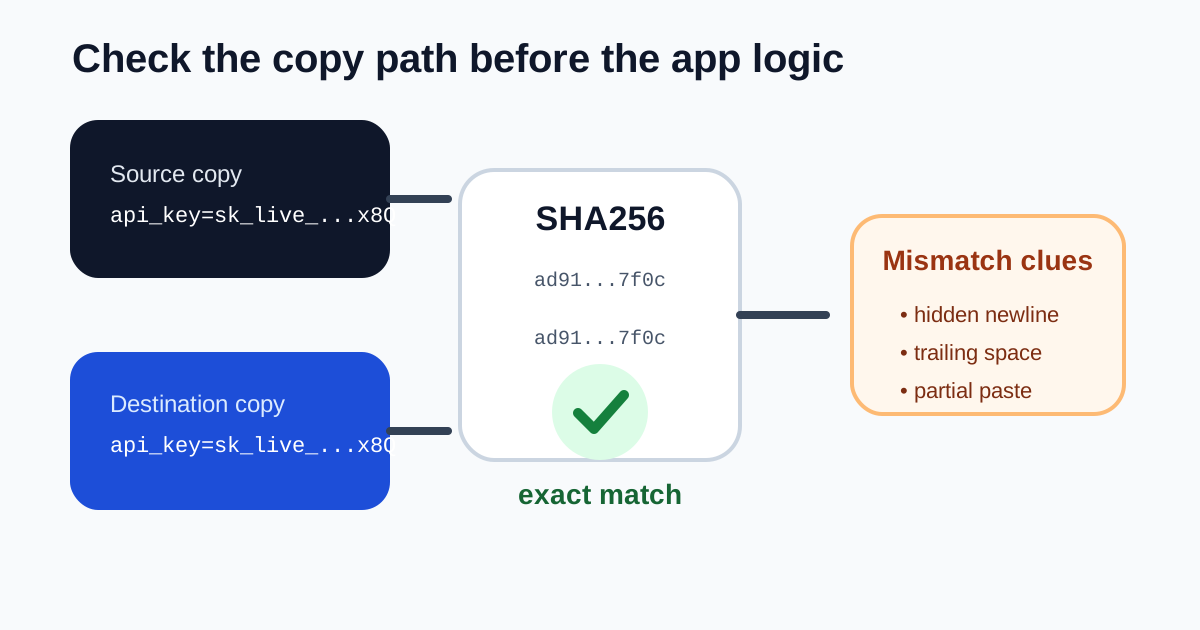
Some debugging sessions start with a false assumption: the two values are 'basically the same.' A secret copied from one dashboard, a webhook signature pasted into a note, or a config fragment moved between systems may look identical enough to the eye while still differing by one hidden newline, one missing character, or one extra space. A quick SHA256 check gives you an exact equality test before you spend another hour blaming the wrong layer.
A simple copy-check tutorial
- Paste the first value exactly as it was copied from the source system, without trimming or reformatting it first.
- Generate a SHA256 hash so you have one stable fingerprint of that full input.
- Paste the second value exactly as it arrived in the destination note, dashboard, or config field and generate the same algorithm again.
- Compare the digests: if they match, the raw text matches exactly; if they differ, keep debugging the copy path instead of the application logic.
- Only after the values match should you move on to permission, parsing, or environment-specific investigation.
Where this catches real mistakes fast
- A teammate pasted a token into chat and you are not sure whether the full value survived the handoff.
- Two exported config strings should match across environments, but one may include a trailing newline.
- A long test payload looks visually identical after copy-paste, yet one field keeps failing a downstream equality check.
- A checksum value from documentation needs to be compared against the exact copied string, not against a cleaned or reformatted version.
Why SHA256 is the safer default here
For a quick comparison task, the most important property is determinism: the same input creates the same output. SHA256 is a modern default that gives you that stable fingerprint without leaning on older habits that still keep MD5 around for legacy compatibility more than for new work.
What this does not tell you
A matching hash does not prove the value is authorized, correctly scoped, or semantically valid. It only proves the exact text you compared is identical. That is still valuable, because it narrows the problem from 'something changed somewhere' to either 'the copy changed' or 'the copy is not the issue.'
Related UtilFlow moves
If you need to see where two long strings differ rather than only whether they match, move to Text Diff next. If the value is encoded rather than plain text, decode it first with Base64 or URL Decode before deciding whether hashing the raw representation or the readable content is the right comparison.
FAQ
Why hash two copied values instead of reading them side by side?
Because long strings often hide tiny differences such as whitespace, line endings, or missing characters that are easy to miss during manual review.
Should I use SHA256 or MD5 for a quick equality check?
SHA256 is the better general default for modern work, while MD5 is mostly useful when you need to match an older checksum format that is already being published elsewhere.
What do I do if the hashes differ?
Treat the copy path as suspect first. Re-copy the values carefully, check for hidden whitespace or truncation, and only then resume debugging the system behavior around them.