Show the Code Sample as Text Before the CMS or Doc Renderer Eats It
HTML entity encoding helps when the real problem is not security theater but disappearing code examples, broken placeholders, and documentation that tries to render the snippet you only meant to show.
Open HTML Entity Encoder/Decoder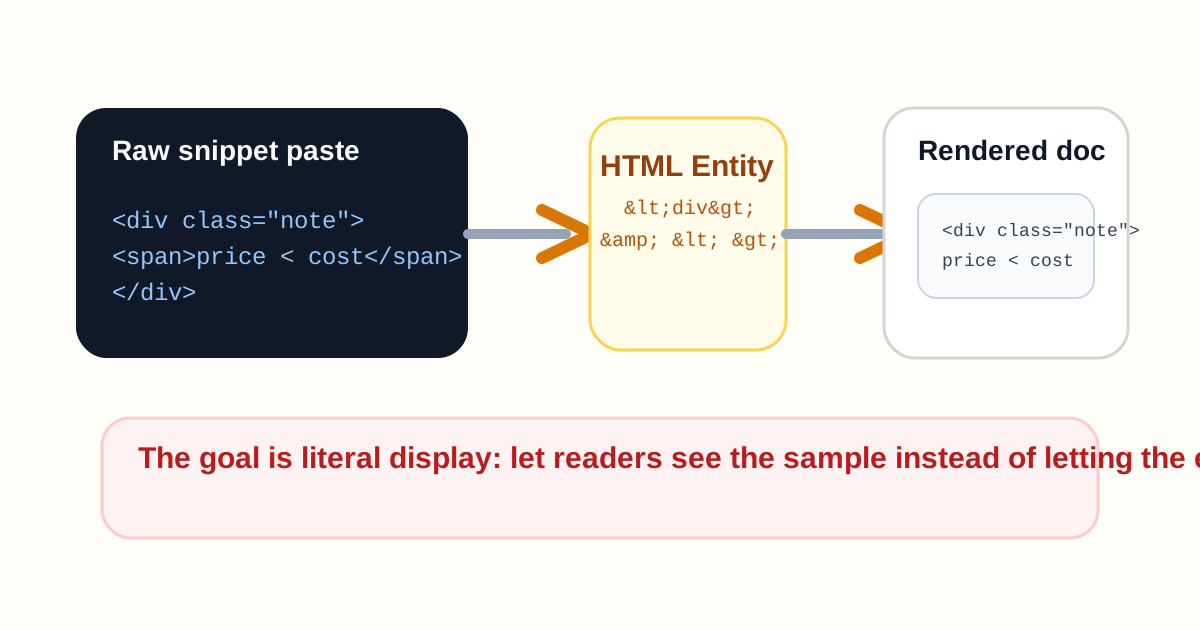
A help article, ticket, or wiki can turn hostile to copied examples very quickly. You paste a tag, placeholder, or comparison string and the destination decides it should render, disappear, or mutate instead of staying visible. Then the person reading the instructions sees an empty gap or half a broken snippet. HTML entity encoding fixes the display problem before you start blaming the CMS, the editor, or the person who copied the example.
What usually goes wrong in real docs
- A support article needs to show a literal HTML tag, but the rich-text editor tries to interpret it.
- A training note should display placeholder tokens such as <customer_id> exactly as typed, but they vanish or collide with formatting.
- A CMS field should show comparison operators or copied embed fragments, but angle brackets and ampersands keep breaking the example.
- A documentation migration moves plain snippets into a new editor that no longer treats raw special characters safely.
Why the problem feels bigger than it is
The visible symptom looks serious because the example disappears, but the fix is often narrow: represent the special characters as entities so the destination can display them literally. That is different from sanitizing untrusted input or designing a full rendering policy. The immediate need is simply to stop the renderer from eating your example.
A cleaner problem-solving workflow
- Identify which part of the copied content should remain visible as text rather than behave like markup.
- Encode only the special characters that need literal display so the example stays readable in the target field.
- Paste the encoded version into the CMS, wiki, or doc block and preview the rendered result immediately.
- If the example still behaves oddly, check whether the destination also applies markdown, shortcode, or template syntax on top of HTML behavior.
Where this helps beyond code samples
Entity encoding also helps with placeholder text, form instructions, config fragments, and any training material where operators or tag-like text must survive copy-paste as visible guidance rather than become live structure.
Related UtilFlow moves
Use HTML Preview when you need to test how a real snippet renders intentionally. Use HTML to Markdown when the content should stop behaving like HTML entirely and move into a more doc-friendly format.
FAQ
When should I encode a snippet instead of previewing it as HTML?
Encode it when the destination should display the snippet literally as documentation text instead of rendering it as live markup.
Does entity encoding sanitize everything?
No. It solves literal display for special characters, not every security or rendering policy question.
Why did my placeholder text disappear?
Because the editor likely interpreted angle brackets or ampersands as part of markup instead of plain text, which entity encoding prevents.