Move Tabular Data Between CSV and JSON With Fewer Surprises
Use a small conversion workflow to move spreadsheet rows and JSON payloads back and forth without mangling headers or values.
Open CSV JSON Converter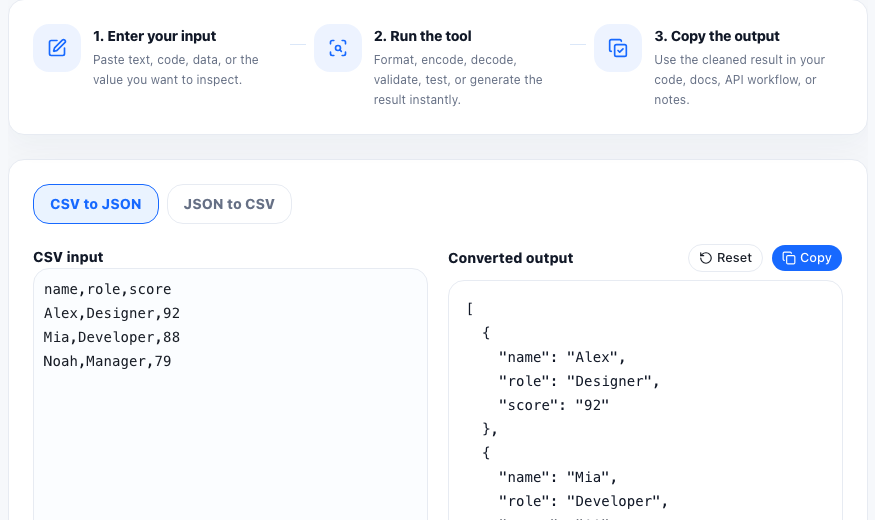
CSV and JSON often meet at handoff points. Someone exports rows from a spreadsheet, an API needs an array of objects, a QA fixture needs quick editing, or a teammate wants to review structured data in a format that is easier to scan. The hard part is usually not conversion itself. It is avoiding silent structure mistakes while moving between row-based and object-based formats.
When this workflow is useful
- Turning a small spreadsheet export into JSON for a seed script or mock API response.
- Converting a JSON array into CSV so a non-technical teammate can review or edit it.
- Checking whether headers and keys line up before an import step.
- Preparing sample data for docs, demos, or testing without opening a heavier data tool.
A conversion workflow that catches the common mistakes
- Start by deciding which format is the source of truth for this step: the sheet-like rows or the object structure.
- When converting CSV to JSON, make sure the first row contains the headers you actually want to become object keys.
- When converting JSON to CSV, check whether the objects use a consistent set of keys or whether some rows will produce empty cells.
- Inspect the converted output for missing values, unexpected blank strings, and headers that came from draft labels instead of final field names.
- Copy the result only after the structure reads cleanly enough that the next person or system can use it without guessing.
What usually goes wrong
The most common problems are inconsistent headers, commas inside values, partial rows, and object arrays whose keys do not match from row to row. Those issues are easier to see when you treat conversion as a review step instead of as an invisible background action.
Related cleanup before or after conversion
Text cleanup, table generation, JSON formatting, and JSON validation all pair well with this workflow. Clean the raw rows first when spacing is messy, and validate the JSON afterward when the converted data is about to enter a real API or config file.
FAQ
What should the first CSV row contain?
It should contain the column headers you want to become JSON keys. If the first row is data instead of headers, the output structure will be misleading.
Why do some CSV rows become empty JSON values?
That usually happens when a row has fewer cells than the header row or when a value was blank in the source data.
Is CSV or JSON better for review?
CSV is usually easier for quick row-by-row scanning, while JSON is better when nested structure or exact key names matter.