Split the Needed Pages, Review Them as High-Resolution Images, and Compress the Final PDF Only If Needed
Use a decision-oriented chained workflow when a large packet should become a smaller review set, cleaner page images, and one final PDF only if the upload or handoff still requires it.
Open Split PDF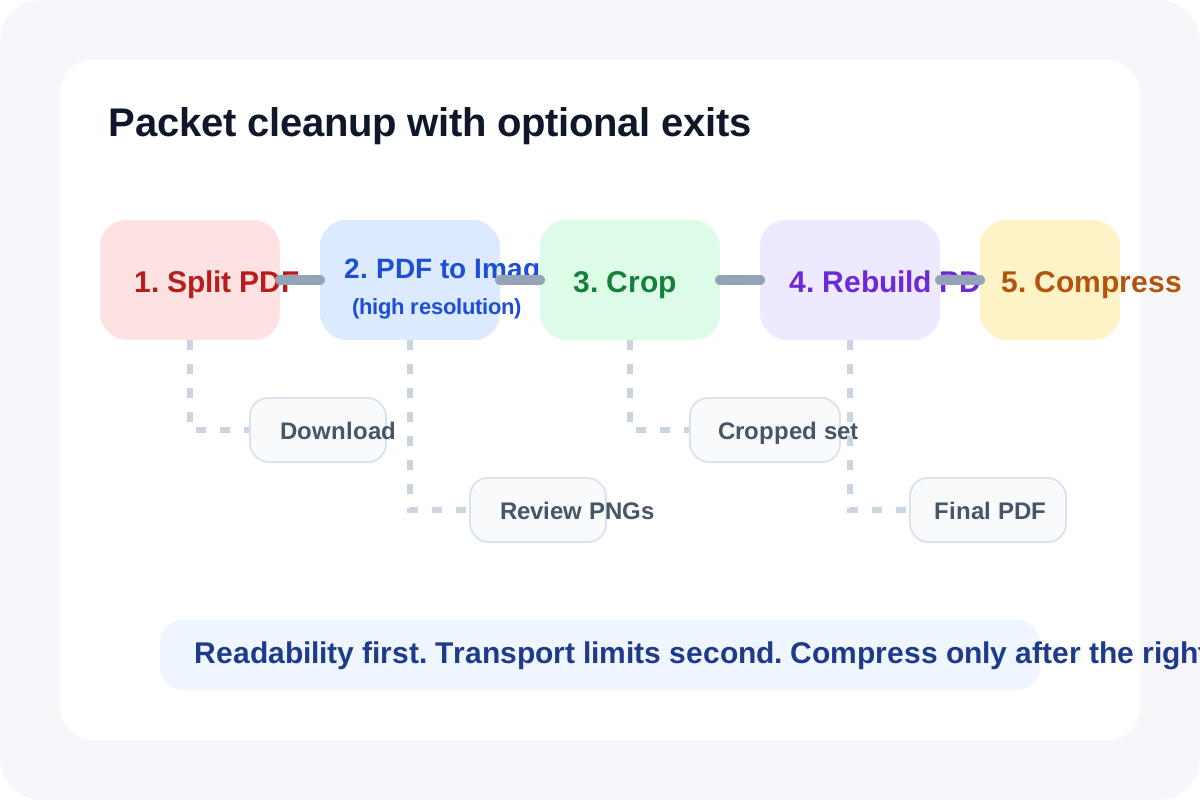
Many PDF cleanup jobs are smaller than the original packet. A reviewer only needs the signed pages, a portal only needs the appendix subset, or a teammate needs page images that are easier to mark up than the PDF itself. This workflow keeps the decisions explicit: isolate the needed pages first, review them as images, crop only what improves legibility, rebuild a document only if that is still useful, and compress the final PDF only if delivery limits still fail.
The tool order
- Start with Split PDF so only the relevant pages move forward.
- Continue to PDF to Images when the next job is a pdf to image high resolution review pass rather than another page-layout edit.
- Use Image Cropper only if margins, scanner borders, or blank edges are making the page images harder to review.
- Move into Images to PDF only when the reviewed image set still needs to become one document again.
- Finish with Compress PDF only if the rebuilt file is correct but the destination still wants a smaller upload.
When to stop and download
- Stop after Split PDF if the smaller packet is already the file you need to send or archive.
- Stop after PDF to Images if reviewers only need page visuals and no rebuilt PDF is necessary.
- Stop after Image Cropper if the cropped images themselves are the handoff for chat, slides, or annotation.
- Stop after Images to PDF if the rebuilt packet is acceptable and the destination does not care about file size.
- Use Compress PDF only at the end when the file is final and the upload still rejects it.
What to check after each step
- After Split PDF: confirm the selected pages are complete and still in the right order.
- After PDF to Images: confirm the page render is readable at the size reviewers will actually use.
- After Image Cropper: confirm the crop removed noise without cutting signatures, totals, or figure labels.
- After Images to PDF: confirm the rebuilt packet is in sequence and still limited to the intended subset.
- After Compress PDF: compare size reduction against text and image clarity before you send it.
Why the final compression step should stay last
The closest live fallback query signal on July 16, 2026 repeatedly surfaced pdf to image high resolution and compress pdf online free after Google Trends itself returned HTTP 429. Those queries map to a real workflow split: readability first, transport second. If you compress too early, you risk making the wrong packet smaller instead of making the right packet easier to review and only then easier to upload.
Related UtilFlow moves
If the page images need visible draft labeling before they circulate, insert Image Watermark before Images to PDF. If the subset later needs page numbering for reviewer references, continue to Add Page Numbers after the rebuilt PDF is final.
FAQ
Why start with Split PDF before a pdf to image high resolution review?
Because isolating the needed pages first keeps the image stage smaller, faster, and more focused on the subset that actually matters.
When should I use Image Cropper in the middle of the workflow?
Use it when extra margins, scanner borders, or blank space are making the page images harder to review or visually heavier than they need to be.
Why leave compress pdf online free style workflows until the end?
Because compression solves the transport limit, not the page-selection or readability problem, so it is safest once the packet is already correct.