Save PDF Pages as JPG for Review, Rebuild the Short Packet, and Compress Only If Upload Still Fails
Use a chained workflow when a review packet should become lighter and more selective: render the pages as images first, convert only the pages that should travel as JPG previews, rebuild the approved subset, and compress the final PDF only when the destination still rejects it.
Open Images to PDF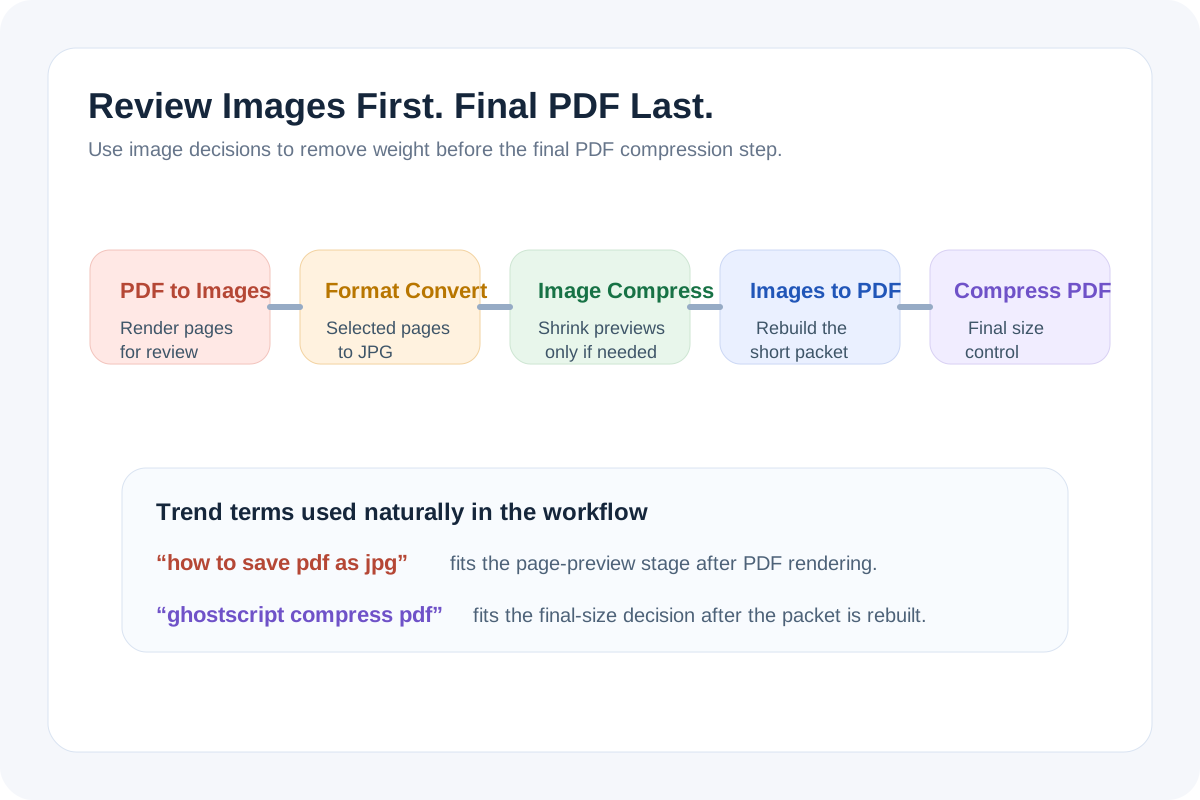
Some PDF jobs do not need one giant document all the way through. Reviewers only need the marked pages, the chat tool prefers lighter image previews, and the upload portal only cares about the final approved subset. This chained workflow keeps those decisions in order: render the pages first, convert only the image pages that should travel as JPG previews, shrink them if the handoff still feels heavy, rebuild the short packet, and run Compress PDF only if the final upload still fails.
The tool order
- Start with PDF to Images so the original PDF turns into page-level review assets before you decide what should keep traveling.
- Use Image Format Converter only for the pages that should become JPG previews or lighter review attachments.
- Continue to Image Compressor when those selected image pages still need to drop in size for email, chat, or ticket uploads.
- Move into Images to PDF when the approved image pages should become one short packet again.
- Finish with Compress PDF only if the rebuilt packet still exceeds the destination limit after you already removed and optimized the right pages.
When the real search is how to save PDF as JPG
Current Google Trends related-query signals in the United States show how action-focused PDF searches remain. One rising query was how to save pdf as jpg. In practice that usually means the team does not want the full PDF yet. They want page-level previews that are easier to review, attach, or drop into a ticket before deciding which pages still deserve to remain in the final packet.
When a ghostscript compress pdf detour is more effort than the job needs
Another rising Google Trends related query was ghostscript compress pdf. That term reflects a real CLI path, but it also hints at a common mistake: trying to shrink the original PDF before deciding whether all of its pages still belong in the handoff. This workflow postpones final PDF compression until the page selection, image conversion, and lighter rebuild are already done, which often makes the last compression step smaller or unnecessary.
What to check after each step
- After PDF to Images: confirm the page previews cover the right pages and stay readable enough for review.
- After Image Format Converter: confirm the JPG pages still preserve the details that matter and that only the selected pages were converted.
- After Image Compressor: confirm labels, signatures, numbers, or diagrams still read clearly at the reduced size.
- After Images to PDF: confirm the packet now contains only the approved pages in the right order.
- After Compress PDF: confirm the final PDF now fits the destination without degrading the pages beyond the review or archive need.
When to stop and download
- Stop after PDF to Images if reviewers only need page images or screenshots for discussion.
- Stop after Image Format Converter if the requirement was specifically to save selected PDF pages as JPG and no rebuilt PDF is needed.
- Stop after Image Compressor if the lighter JPG previews are already the final deliverable.
- Stop after Images to PDF if the short rebuilt packet already fits the destination limit.
- Use Compress PDF only when the rebuilt packet is still too large after the workflow already removed and optimized the right pages.
Related UtilFlow moves
If some selected page images need trimming before the JPG stage, add Image Cropper between the first and second steps. If the final packet needs page references for review, continue into Add Page Numbers after the rebuild and before the optional final compression.
FAQ
Why not compress the original PDF first?
Because the original file may still include pages that do not belong in the handoff. Removing and optimizing the right pages first often solves more than compression alone.
When should I stop at the JPG stage instead of rebuilding a PDF?
Stop at JPG when reviewers or recipients only need page previews, ticket attachments, or visual snippets rather than one formal document packet.
How did Google Trends shape this workflow?
I used the rising related-query terms how to save pdf as jpg and ghostscript compress pdf to frame the real user decisions around page-level image previews first and final PDF compression only when the rebuilt packet still fails upload.