Read the CSS Cascade Before You Debug the Wrong Selector
Use a CSS formatter when copied styles are technically valid but too dense to show where the override, nesting, or specificity problem actually starts.
Open CSS Formatter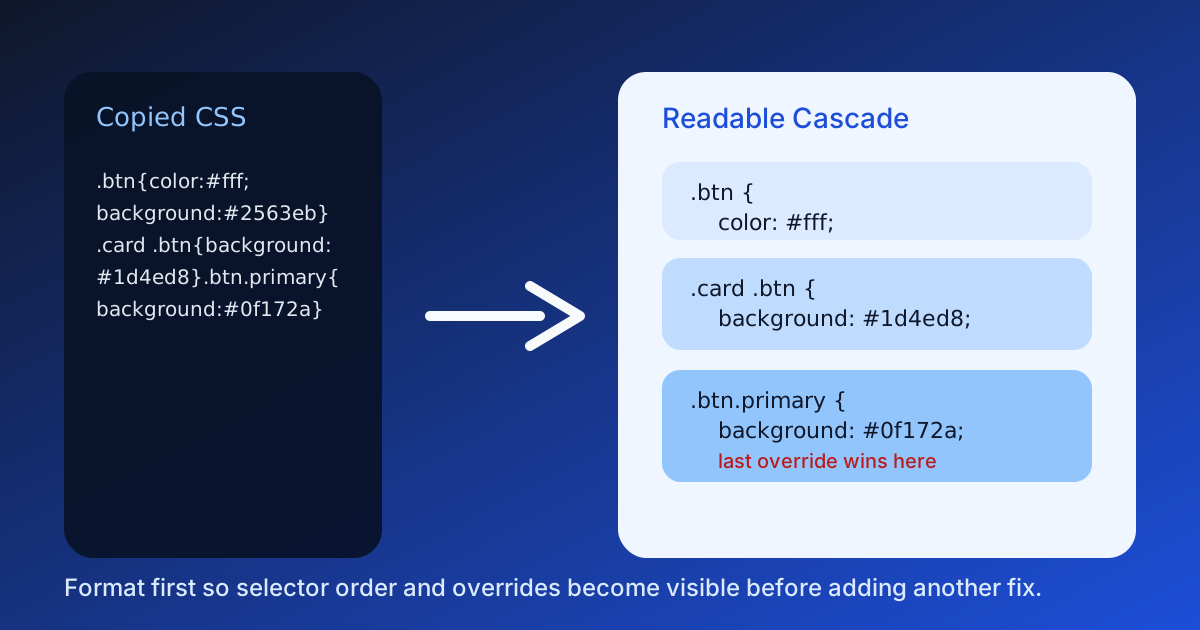
Broken styling often sends people to the wrong battlefield. A button looks wrong, so someone changes classes or adds `!important` before they have even restored the stylesheet into a readable shape. When copied CSS arrives compressed, badly wrapped, or mixed from several sources, a formatter is the fastest way to see selector order, nested blocks, and where one override actually starts beating another.
What formatting changes technically
A CSS formatter does not alter the browser's cascade rules. It changes presentation so humans can inspect the order of selectors, declaration grouping, media-query scope, and repeated properties without mentally unpacking a single dense line.
Where unreadable CSS hides the real bug
- A copied component stylesheet includes several near-identical selectors and the wrong one appears to 'win' because the order is hard to scan.
- A build artifact or AI-generated snippet compresses nested rules until media-query boundaries are easy to miss.
- A teammate pastes utility overrides into chat, but one repeated property farther down the block is the real reason the style changed.
- A CMS or email export keeps valid CSS but wraps it so unevenly that you cannot tell whether the issue is specificity, inheritance, or plain duplication.
A practical technical read sequence
- Paste the CSS exactly as copied so you inspect the real source rather than a hand-cleaned version.
- Format it and read from the broadest scope down: globals, component rules, responsive overrides, and last-minute exceptions.
- Mark where the same selector or property appears more than once before changing any values.
- Only after the structure is readable should you decide whether the bug is cascade order, selector targeting, or a missing class in markup.
Why this matters before previewing the page again
Previewing a broken page tells you that something is wrong. Readable CSS tells you where to look next. Formatting first keeps you from layering more overrides onto a stylesheet that already contains the clue you missed.
Related UtilFlow moves
Use HTML Formatter when the structure feeding the styles is also hard to read. If the final job is shipping a compact snippet into a CMS or email tool, move to CSS Minifier only after the cascade is already understood.
FAQ
Does a CSS formatter fix specificity problems?
No. It makes the stylesheet readable enough that you can identify selector order, scope, and duplication before you change the CSS itself.
Should I format CSS before adding another override?
Yes when the source is messy, because another override can hide the real issue instead of solving it.
When is a CSS formatter most useful?
It is most useful for copied styles from build output, AI snippets, CMS exports, emails, or shared chat messages where readability was lost during handoff.