Fix Sideways Pages, Run a PDF to PNG Pass, Add Review Watermarks, and Rebuild One JPG to PDF Packet
Use a chained workflow when a scanned packet needs orientation fixes first, then a PDF to PNG review pass, then visible draft marks, and only at the end one rebuilt JPG to PDF packet for controlled sharing.
Open Rotate PDF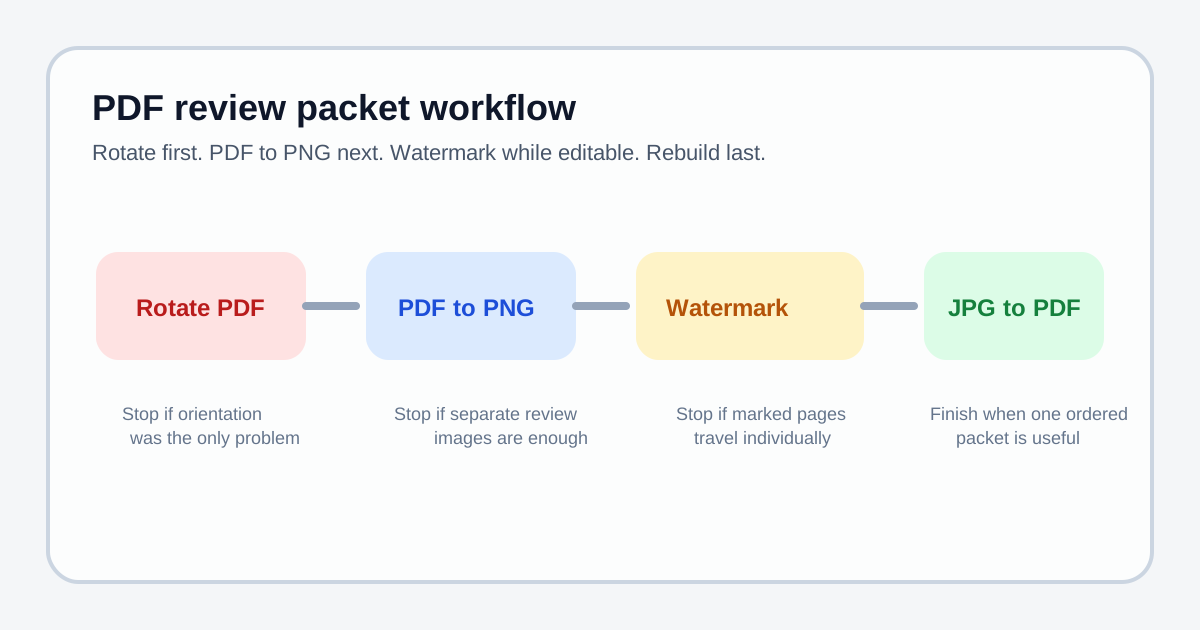
Some review packets fail because the pages are not ready to travel yet. The scan opens sideways, reviewers should not forward the pages as if they were final, and the team only wants one marked packet after those issues are fixed. That calls for a small chain: rotate the PDF first, run a PDF to PNG pass so each page becomes a workable image, add the review watermark while the pages are still editable, and rebuild one JPG to PDF or image to PDF packet only when the marked set is ready.
The tool order
- Start with Rotate PDF so the page orientation is correct before any page turns into an image.
- Continue to PDF to Images when the corrected pages need a PDF to PNG review pass.
- Use Add Watermark to Image while each page still behaves like an individual review asset.
- Finish with Images to PDF only when the marked pages should travel as one final review packet.
When to stop and download
- Stop after Rotate PDF if the packet only needed orientation repair.
- Stop after the PDF to PNG pass if reviewers need separate page images for chat, slides, or annotation.
- Stop after Add Watermark to Image if the marked files will be shared individually rather than as one packet.
- Continue to JPG to PDF or image to PDF only when the recipient benefits from one ordered file.
What to check after each step
- After Rotate PDF: confirm every page now opens at the intended reading angle.
- After the PDF to PNG pass: confirm text and diagrams stay readable at the exported image resolution.
- After watermarking: confirm the review mark is visible enough to prevent confusion but does not block the content itself.
- After the final rebuild: confirm the order still reads correctly and that the packet is ready for the handoff channel.
Why these PDF trend terms fit this workflow
Google Trends guidance points you toward related rising queries, and current PDF search context still clusters around action phrases rather than abstract document management language. For this workflow I used pdf to png and jpg to pdf as the growing task terms because they describe the exact middle and final handoff steps: first turn the corrected pages into workable review images, then rebuild one controlled packet only if the packet still needs to travel as a single file. I am inferring the workflow fit from the current Google Trends research approach and broader PDF search-demand context rather than claiming an exact breakout percentage for these terms.
Related UtilFlow moves
If the rebuilt packet is still too heavy for the destination, run Compress PDF last. If some page images need trimming before the final rebuild, insert Image Cropper between the watermark step and the JPG to PDF step.
FAQ
Why rotate the PDF before running a PDF to PNG pass?
Because orientation problems are easier to fix while the pages are still PDF pages, before every page becomes a separate image file.
When should I keep the result as PNG pages instead of rebuilding a PDF?
Keep the PNG pages when the next destination is review, chat, slides, or another image-friendly workflow and one combined packet is unnecessary.
Why add the watermark before the final JPG to PDF rebuild?
Because the watermark is easier to control on the page images directly, while the final rebuild is best reserved for the moment the marked set is actually ready to travel as one packet.