Extract Text From PDF, Clean It, Time the Read, and Turn It Into a Checklist Before Review Stalls
Use a chained PDF workflow when a long policy, onboarding packet, or vendor guide should become clean text, a realistic reading estimate, and an action checklist instead of another vague 'edit PDF text' request.
Open Extract Text from PDF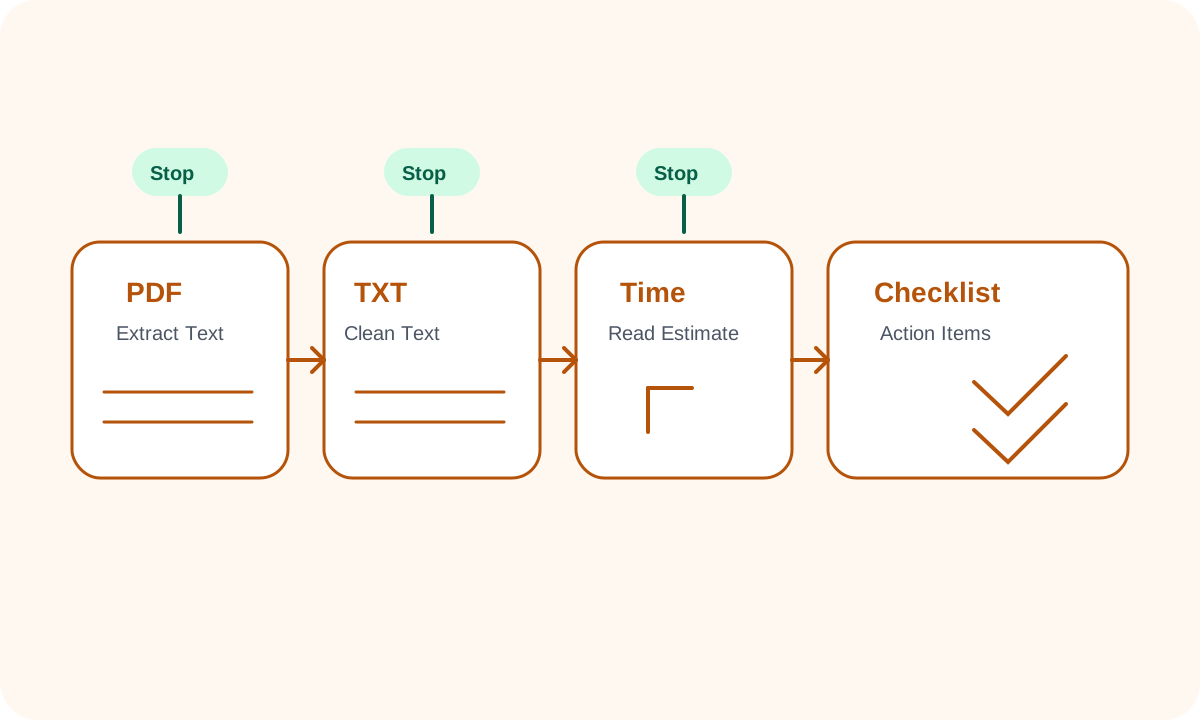
A lot of 'edit PDF text' requests are really planning problems in disguise. Someone does not need to redesign the PDF page layout. They need the content out of the file, cleaned into readable text, sized for a realistic review pass, and converted into actions. That is where a chained workflow is better than opening a generic editor and hoping the right text becomes easy to reuse.
The tool order
- Start with Extract Text from PDF so the packet becomes copyable, searchable text instead of page geometry.
- Continue to Text Cleaner to remove the broken line wraps, doubled spaces, and pasted list noise that often come out of extracted PDF text.
- Move into Reading Time once the text reads cleanly enough to estimate the real review load.
- Finish with Checklist Maker when the cleaned and timed content now needs to become an approval list, onboarding steps, or a review task sequence.
When to stop and download
- Stop after Extract Text from PDF if the real need is a plain TXT file for search, quoting, or paste-ready notes.
- Stop after Text Cleaner if the cleaned text itself is the final deliverable for a brief, ticket, or AI prompt.
- Stop after Reading Time if the team only needed to know whether the packet is realistically reviewable in one sitting.
- Continue to Checklist Maker only when the text now has to become assigned or sequential action, which is the point where a checklist is more useful than another edited paragraph block.
What to check after each step
- After Extract Text from PDF: confirm the file contains selectable text and that key paragraphs arrived in the right reading order.
- After Text Cleaner: confirm headings, bullets, and sentence breaks still reflect the original meaning instead of becoming one flat wall of text.
- After Reading Time: decide whether the packet should stay whole, be split for review, or be summarized before the meeting.
- After Checklist Maker: confirm each item starts with an action and that ownership or sequence is obvious enough to move into the next system.
Why this beats a generic edit PDF text loop
The closest live related-query signal during this run surfaced extract text from pdf and edit pdf text phrasing repeatedly. That matches the real user intent here: people are not usually trying to redesign the page file itself. They are trying to get workable content out, make it readable, judge the effort, and move it into the next tool without retyping from scratch.
Related UtilFlow moves
If the source file is image-only and the extracted text is incomplete, switch first to PDF to Images for a page-review workaround before deciding whether the packet needs OCR outside this workflow. If the review packet eventually needs a smaller shareable document again, continue later into Images to PDF or Compress PDF only after the text-side work is settled.
FAQ
When is extract text from pdf better than trying to edit pdf text directly?
It is better when the real job is reuse, review, quoting, summarizing, or action planning rather than preserving the original PDF page layout.
What should I do if the extracted text looks messy?
Run it through Text Cleaner next, then check paragraph breaks, lists, and repeated spaces before you move on to timing or checklist work.
Why include Reading Time in a PDF workflow?
Because long packets stall reviews when nobody names the real effort. A quick reading-time estimate tells you whether the document is a five-minute pass, a thirty-minute task, or something that should be split up first.