Delete Extra Pages, Fix Order, and Add Page Numbers Before You Finalize a PDF Packet
Use one chained PDF workflow to clean a packet that is already assembled: remove the pages that should not ship, fix the sequence, add page references, then compress only if the final file still needs to be smaller.
Open Delete PDF Pages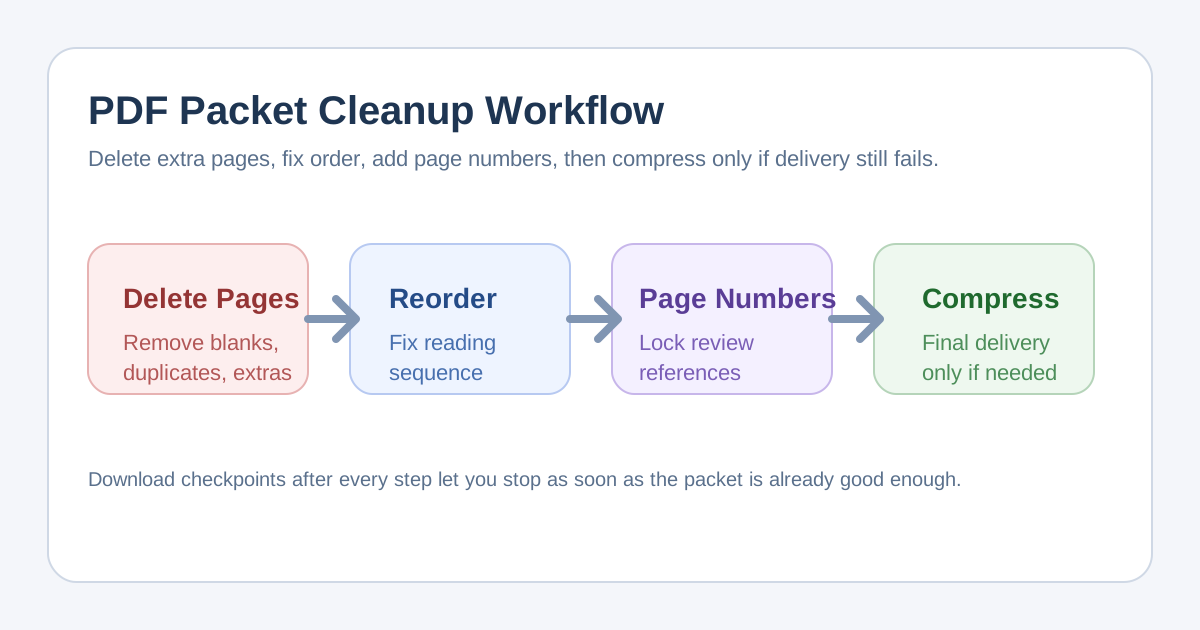
Many people start with a broad pdf editor search when the packet is already assembled but still not ready to send. The real job is narrower: remove the pages that should not leave the draft, fix the reading order, add page references reviewers can cite, and compress the result only if the final upload still complains about size.
The tool order
- Start with Delete PDF Pages when the packet includes blank scans, cover sheets, duplicate pages, or sections the recipient should never see.
- Move to Reorder PDF Pages after the scope is correct so the remaining packet reads in the intended sequence.
- Continue to Add Page Numbers to PDF only after the order is final, so the page references stay stable in comments and approvals.
- Finish with Compress PDF if the cleaned packet is correct but still needs a smaller delivery file, including cases where someone is effectively chasing a pdf compressor to 1mb outcome for a strict portal limit.
When to stop and download
- Stop after Delete PDF Pages if the smaller packet is already complete and the order was never wrong.
- Stop after Reorder PDF Pages if reviewers do not need page references and the file size already fits the destination.
- Stop after Add Page Numbers when the packet is now clear, navigable, and accepted at its current size.
- Run Compress PDF only when the final delivery channel still rejects the file after the content and structure are already correct.
What to check after each step
- After Delete PDF Pages: confirm that no required appendix, signature page, or instruction sheet was removed with the clutter.
- After Reorder PDF Pages: confirm that the narrative flow, appendix placement, and reviewer reading path now make sense.
- After Add Page Numbers: confirm the numbers do not cover important content and that reviewers can cite the exact page they mean.
- After Compress PDF: compare file size and readability, especially on scanned pages or image-heavy sections.
Why this chained workflow is cleaner than generic edit PDF thinking
Generic edit pdf language hides the real decisions. Packet cleanup becomes safer when each tool has one job. Delete pages sets scope, reorder fixes structure, numbering improves review, and compression handles delivery. That separation reduces accidental rework on a packet that was already close to finished.
Related UtilFlow moves
If the packet starts as separate files rather than one assembled PDF, begin with Merge PDF before this chain. If reviewers only need page visuals, continue next into PDF to Images instead of forcing every workflow to stay document-first.
FAQ
Why should page deletion come before reordering?
Because the cleanest page order is easier to set once the pages you do not want are already gone.
When should I add page numbers in this workflow?
Add page numbers after the order is final so comments and approvals do not refer to page numbers that later change.
Can this workflow help when I need a pdf compressor to 1mb?
Yes, but only after the packet itself is already correct. Deleting pages and fixing order first often removes more unnecessary weight than compressing the wrong packet.